How to Unlock a Combination Padlock
Forgetful moment at the door? Don't worry, learning how to unlock a combination padlock can save your day. These versatile locks are widely used owing to their simplicity and security. Whether you've forgotten the combination or need to reset it, we'll guide you through the process with these step-by-step instructions.
Before we dive in, ensuring you have the correct lock type is crucial. There are three main types: direct-set, dual-numbering, and registry number. This guide assumes you're dealing with a direct-set or dual-numbering lock, which are the most common.
Gathering Your Tools
First, you'll need a few tools to help you unlock your combination padlock. Here's what you'll need:


- Patience - Combination locks take time and patience to unlock.
- A reset tool or small Allen key - Optional, depending on the lock type.
- Paper and pen - To keep track of dial positions.
Direct-Set Combination Locks
If your lock has numbers that you can directly set, follow these steps:
- Rotate the dial to the right until it stops.
- Begin with the first number. Starting from '0', slowly rotate clockwise while listening for a slight 'click' or 'thud' sound. This indicates you've found the first number in the combination.
- Repeat step 2 for the remaining numbers in the combination, resetting the dial to the right after each number.
- Once you've found all the numbers, the lock should open with a quarter turn to the left.
Dual-Numbering Combination Locks
For locks with two sets of numbers, the process is slightly more complex:

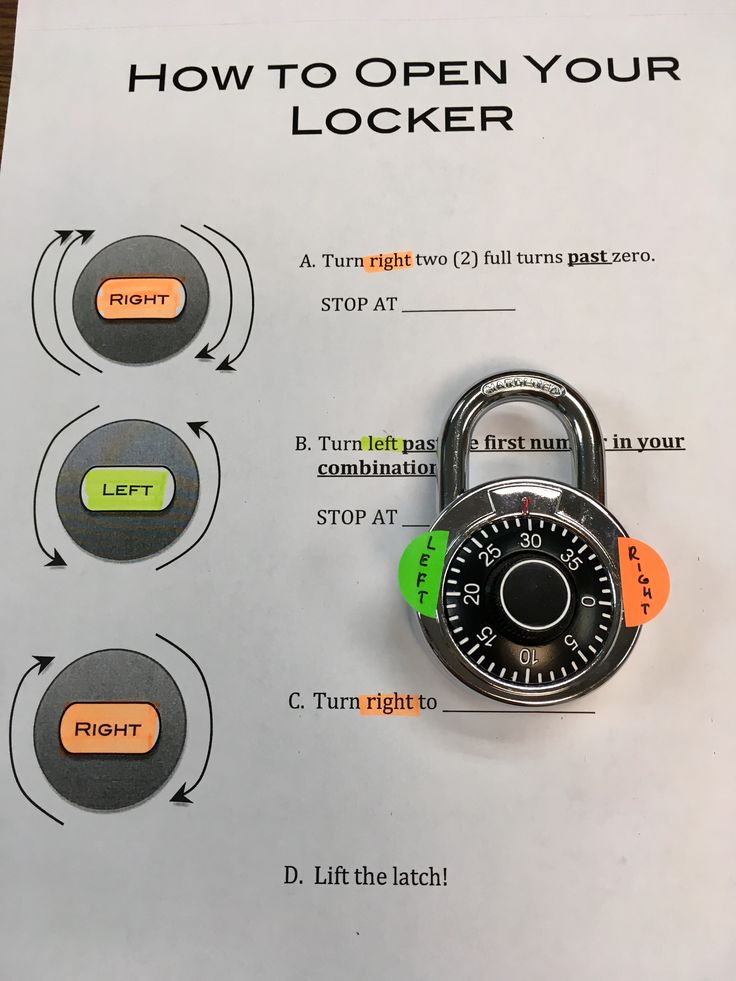
- Rotate the dial to the right until it stops.
- Begin with the first number. Start from '0' and slowly rotate clockwise, listening for that click or thud. Once you hear it, note down this number.
- Rotate the dial to the left until it stops. Repeat the process to find the second number in the combination.
- Now, starting from the rightmost dial, input the combination you've found. The lock should open with a quarter turn to the left.
Resetting the Combination
If you've unlocked your padlock but would like to change the combination, here's how to do it:
Direct-Set Combination Locks
For direct-set locks, you'll usually find a small hole or a slot for a reset tool:
- Insert the reset tool into the hole.
- While holding the tool in place, spin the dials to a new combination.
- Slowly pull out the reset tool. The lock should now be set to the new combination.
Dual-Numbering Combination Locks
For dual-numbering locks, resetting typically involves these steps:
- First, follow the unlocking process to open the lock.
- Find the small reset hole. Insert the reset tool into it.
- While keeping the tool in place, turn the dials in a clockwise direction to set your new combination.
- Gently release the tool. The lock should now be reset to your new combination.
And there you have it! Now you know how to unlock a combination padlock and reset the combination. Happy securing! Remember, practice makes perfect with locks, so keep trying until you get it right. Next time you're locked out, don't hesitate to give these steps a try.
Related Articles

How to Unlock a Padlock Without Combination
Ever found yourself in a pickle when you've misplaced your combination key or can't remember the code for your padlock? Don't worry, all is not lost. This...
Master Hacks: Unlock Padlock Without Combination
Imagine finding an old, forgotten padlock while rummaging through your garage, only to discover you've misplaced the combination. Or perhaps you've locked...
Unlock Instantly: How to Open Master Lock Combination Padlock
Ever found yourself in a predicament where you've forgotten the combination to your master lock combination padlock? It's a common occurrence, but fear not! In...
Unlock Combo Lock Without Code
Imagine reaching for your padlock, a barrier between you and your belongings, and realizing you've misplaced or forgotten the combination. It's a frustrating...

Unlock Samsonite Luggage: Forgotten Combination Rescue
So, you've found yourself locked out of your Samsonite luggage, and the code seems to have slipped your mind? Don't worry, you're not alone. Many travelers...
Steps to Easily Unlock Padlocks
Ever found yourself in a pickle, staring at a padlock that seems to be laughing at your attempts to unlock it? You're not alone. Padlocks can be fickle...